Smoothing Parameter Optimization & Tuning
A central question in Generalized Additive Models is choosing the smoothing parameter \(\lambda\) (or \(sp\)) to achieve the optimal balance between fidelity to data and smoothness.
magli supports two distinct mathematical approaches:
Continuous REML Optimization (Wood engine): Solves for optimal \(\lambda\) continuously during
fit()(Wood 2011).Discrete GCV Grid Search (Eilers-Marx engine): Evaluates a Cartesian grid of candidate \((K, \lambda)\) values via cached QR+Cholesky (Eilers & Marx 1996).
1. Continuous REML Optimization (Wood 2011)
In the Wood backend, smoothing parameters are estimated automatically during model fitting:
from magli import LinGAM, GAMCore

# Single-term - REML estimates lambda automatically
m = LinGAM(k=10, bs="cr", backend="wood")
m.fit(x, y)
print(f"Optimal estimated lambda: {m.lam:.4f}")

# Multi-term - Simultaneous multi-dimensional REML optimization
g = GAMCore("s(0, k=10) + s(1, k=10) + l(2)", backend="wood")
g.fit(X, y)
print(g.summary())
How it works:
Uses Brent’s bounded scalar search (single free \(\lambda\)) or L-BFGS-B with exact analytic gradients (multiple free \(\lambda\), e.g. multi-term models or one per tensor dimension) on the Restricted Maximum Likelihood (REML) or Generalized Cross Validation (
method='GCV.Cp') criterion in continuous log-lambda space (\(\rho = \log\lambda \in [-15, 15]\)).Outer iteration updates \(\log \boldsymbol{\lambda}\); inner step computes penalized least-squares coefficients \(\boldsymbol{\beta}\) and hat matrix traces.
Avoids the discretization error, manual grid configuration, and combinatorial scaling of discrete grids.
Optional basis-dimension search: Wood models also provide
m.gridsearch(x, y, n_splines=...)(org.gridsearch(X, y, n_splines_grids=...)) if you want to sweep candidate basis dimensions \(k\) while REML/GCV optimizes \(\boldsymbol{\lambda}\) continuously at each candidate \(k\).
2. Discrete GCV Grid Search (Eilers-Marx 1996)
The Eilers-Marx backend evaluates a user-defined or default grid of \((K, \lambda)\) candidates by minimising the Generalised Cross Validation (GCV) criterion.
from magli import LinGAM, GAMCore

m = LinGAM(n_splines=10, backend="eilers")
m.gridsearch(x, y)
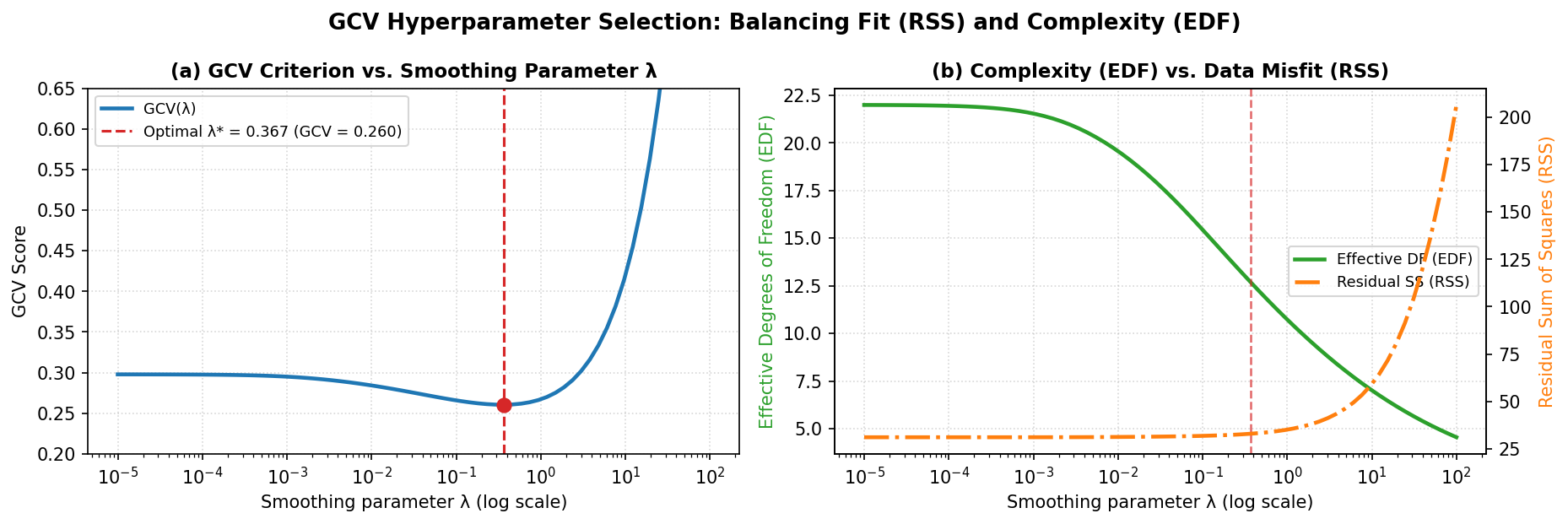
The left panel shows the U-shaped GCV curve across candidate \(\lambda\) values, balancing residual sum of squares against model complexity, while the right panel shows how \(\lambda\) increases, the effective degrees of freedom (EDF) contract toward the linear null space while the residual sum of squares (RSS) rises.
Two-phase fast QR+Cholesky evaluation
Phase 1 (K precomputation): For each candidate spline dimension \(K\), construct design matrix \(X\), compute its QR decomposition \(X = QR\), and cache \(R^\top R\) and \(R^\top Q^\top y\). These depend only on \(K\) and are computed once.
Phase 2 (Lambda evaluation): For each candidate \(\lambda\), assemble penalty matrix \(P = \lambda S\), solve \((R^\top R + P) \boldsymbol{\beta} = R^\top Q^\top y\) via Cholesky factorization, compute EDF from the Cholesky-based trace \(\operatorname{tr}(H^{-1} R^\top R)\), and record GCV. Both phases run under
ThreadPoolExecutorwhenn_jobs != 1(serial by default).
Default search grids
Lambda:
np.logspace(-3, 3, 11)(11 values from 0.001 to 1000), applied diagonally, meaning that every searched slot shares the same candidate value per evaluation.n_splines: not searched by default; each term keeps its configured value unless explicit
n_splinesgrids are passed.
Selective search (search_terms)
When confident in the parameters for some terms, restrict the grid search to a subset:
model = GAMCore("s(0) + s(1) + te(0, 1)", backend="eilers")

# Search only univariate splines (s)
model.gridsearch(x, y, search_terms=['s'])

# Search only term 0 and factor terms
model.gridsearch(x, y, search_terms=[0, 'f'])
Custom grids per term slot
model.gridsearch(
    x, y,
    lam_grids=[
        np.logspace(-2, 2, 5),   # s(0)
        np.logspace(-1, 1, 3),   # te dim 1
        np.logspace(-1, 1, 3),   # te dim 2
    ],
    n_splines_grids=[
        np.arange(5, 15, 2),     # s(0)
        np.arange(4, 8),          # te dim 1
        np.arange(4, 8),          # te dim 2
    ],
)